Airvine
Updating Firmware Releases in Downloads
☝🏼 How to update the VineOS Firmware Download files on Airvine.com
BACKGROUND
Airvine has product related downloads in two locations on their website.
- At the bottom of the Support landing page. If you scroll down you will see it. The URL to the Support page is:
https://airvine.com/support/ - At a dedicated URL below the Support page. If you click the 'Downloads' CTA button you will get to this page. The dedicated URL is:
https://airvine.com/support/downloads/
Clicking this CTA links to a dedicated Downloads page
It is the same content, being served up by MightyDev's Resource Library plugin.
PRODUCTION STEPS
Airvine Engineering will provide two files
- The firmware release image (installer)
- The Release Notes PDF
The production steps:
- Rename the new files according to previous format (follow previous files, the names of supplied files may vary each time)
- ZIP the two new files and EULA into a new archive
- Update the ZIP archive on Sirv.com
- Update the Release Notes PDF on Sirv.com
- Update the title of the resource in WordPress for the ZIP file, with the new release number
- Update the title of the resource in WordPress for the Release Notes PDF, with the new release number
Read the remaining article for complete details and instructions for all steps.
FIRMWARE RELEASE CUSTOM FUNCTION
☝🏼 The Firmware Release is listed in downloads, but it has added custom functionality: A user is required to pass through a EULA Acceptance step in order to download the ZIP file.
There are two parts to the custom function:
- A special URL structure
- A 'gated page' that requires users to scroll through the EULA before accessing the file
This custom function is built into the Airvine theme, and is tied to the custom URL structure.
URL STRUCTURE
The EULA acceptance feature is tied to the URL structure. This is a general purpose widget that Mighty Digital built into the Airvine theme. This custom URL must be used in order to trigger the EULA function.
The full URL looks like this:
https://airvine.com/eula/?download=https://cousides.sirv.com/firmware/Airvine-WaveTunnel-Firmware.zip
The first part of the URL with the parameter ?download= indicates the function being called
https://airvine.com/eula/?download=
The second part is the full (absolute) URL to the ZIP file being downloaded (after accepting the EULA)
https://cousides.sirv.com/firmware/Airvine-WaveTunnel-Firmware.zip
💡 UPDATE: as of Sept 2024, Sirv URLs for Airvine are now branded, and begin with https://media.airvine.com
Below are current examples of firmware download URLs.
https://airvine.com/eula/?download=https://media.airvine.com/firmware/Airvine-WaveCore-Firmware.zip
The location of the target file can be any web URL. Airvine is using Sirv.com for media hosting, so we have the ZIP file stored here in our example.
This custom link is placed in the field 'Direct Link URL' in the WordPress editor when creating the Resource. The rest happens in the theme automatically.
The URL to the ZIP file is not protected with a file locking mechanism. In other words, the EULA process is a soft barrier that can be circumvented by a user who knows how. It is mainly to demonstrate that a EULA Acceptance step exists, but it does not have an enforcement feature. If a savvy user were to copy and paste the ZIP file URL directly into the address bar of a browser, the download will work. This is by design.
BEHAVIOR
When a user clicks on the Firmware Release link, they go to the EULA agreement page.
The user must scroll through the EULA content (which is a PNG of the document's text), all the way to the end, before the CTA buttons are activated. This forces them to scroll through the entire doc, to demonstrate to Legal that yes, the user went to the bottom of the whole document before they could get to the ZIP file.
This is the EULA page before scrolling. The CTA buttons are inactive.
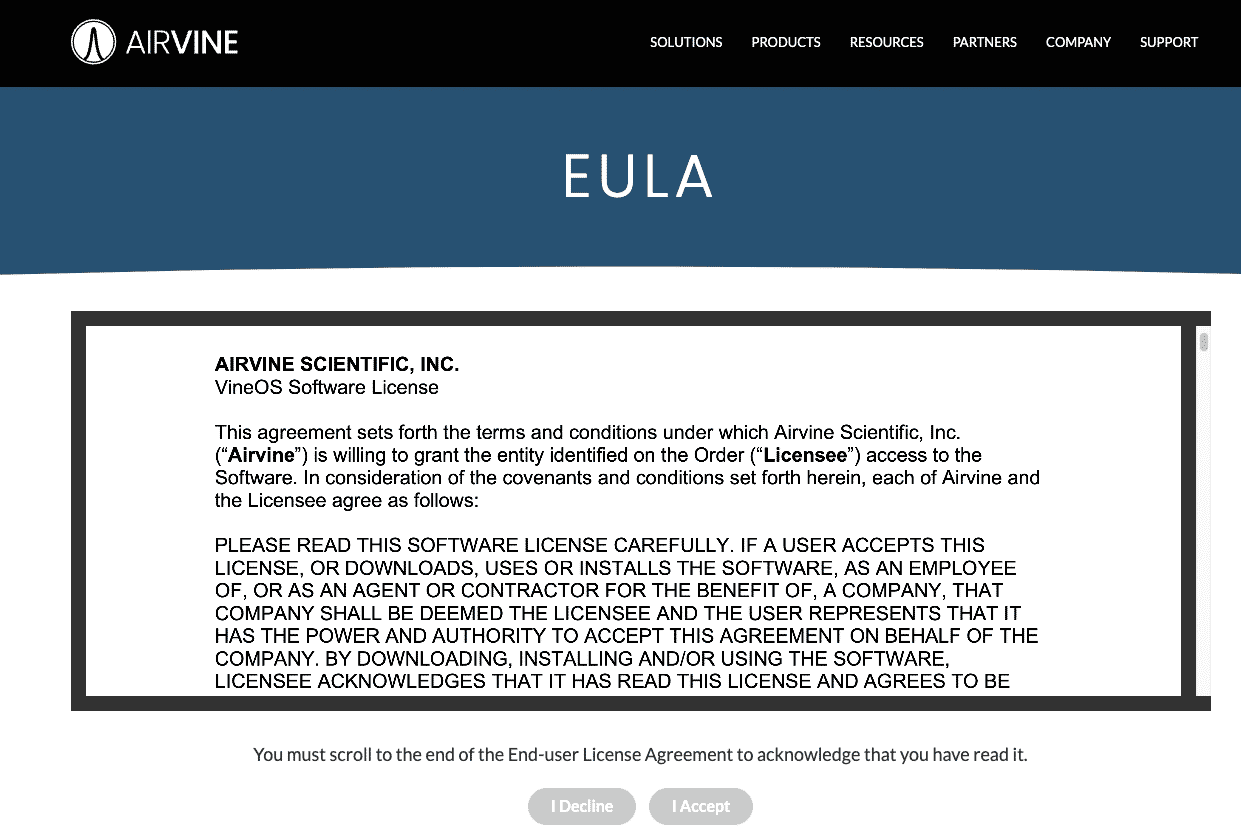
Once the user reaches the end of the EULA scroll, the CTA buttons become active, and they can click I Accept, which initiates download of the ZIP file. If they choose I Decline, no file will download.

The EULA page and its content are custom coded within the Airvine theme. If the page layout, function or the EULA document image need updating, that is done on the backend by Mighty Digital.
FIRMWARE CONTENT
There are three elements to a Firmware Release. These are the contents of the ZIP file the user downloads:
- The firmware image file
- A Release Notes PDF
- The End User License Agreement PDF (EULA)
The EULA is boilerplate and does not change very often. So the two files that do change are the image file (the software) and the Release Notes PDF.
When the engineering team at Airvine sends updates for new releases, the two key files need to be packaged up with the EULA into a new ZIP and uploaded to the appropriate location in Airvine’s Sirv.com account.
UPDATING THE FIRMWARE FILES & RESOURCE LIBRARY POSTS
There are four things that get updated with a new Firmware Release for Airvine
- The ZIP file on Sirv.com
- The Release Notes PDF on Sirv.com
- The Firmware Release Resource in WordPress
- The Release Notes Resource in WordPress
THE ZIP FILE CONTENTS
The ZIP file contains three files:
- The software image update
- The release notes PDF update
- The EULA boilerplate PDF, which does not often change.
The Folder name remains the same: Airvine-VineOS-Firmware
The EULA PDF filename does not change. If a new version is provided, rename it to the standard: Airvine-VineOS-EULA.pdf
The release Image and Release Notes PDFs will change with the version number. There is no agreed upon filenaming scheme, so we have been using this for now:
- Airvine VineOS 0.0.0 Release Notes 0.0.0.pdf
- avsImage-0.0.0
The zeroes are replaced by the current release number. The number should be the same on both files.
Example of the release posted Nov 7, 2023:
- Airvine VineOS 1.2.0.62 Release Notes 1.2.0.62.pdf
- avsImage-1.2.0.62
- Airvine-VineOS-EULA.pdf
Once the ZIP file is created and ready, it can be uploaded to the Airvine Sirv.com account, overwriting the existing ZIP. Alternatively you can rename the existing ZIP to a dated version for archiving, and upload the new ZIP fresh. Either way It is a good idea to purge the Sirv.com cache of that file, as well as reload/clear cache on the website (also can check in Incognito mode). Ensure that the new ZIP contents are correct by downloading via the EULA process and unpacking the ZIP to check the filename is the correct version.
RELEASE NOTES PDF
The Release Notes PDF is also uploaded directly to the Downloads under its own Resource object. The PDF is loaded into a Collateral folder on Sirv.com. In this case the current release notes doc is renamed to the existing filename of "Airvine-VineOS-Release-Notes.pdf". Purge cache as noted above, and check that the latest version of the PDF loads on the website.
LINK LABELS & FILE NAMES
Links have two parts: The label (the part you see displayed in the browser) and the URL (the address of the file on the web that is encoded in the HTML). This can get confusing because sometimes they look exactly the same, when in fact they are two different things.
In both Resource objects in WordPress (The Release Notes PDF and the ZIP package), the Title field text can be updated with the current release number. This displays on the Resource tile as the link label, and it is useful for users and search engines to have the release numbers in view.
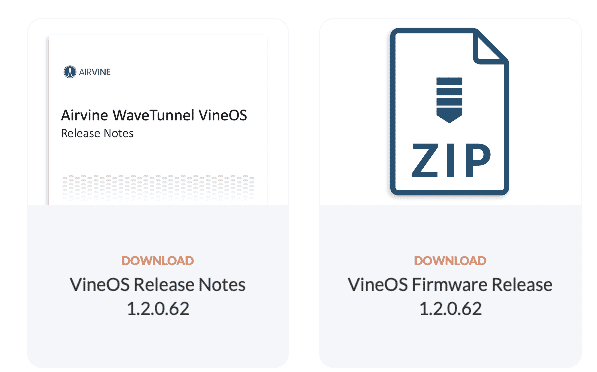
Resources with version number in the link label
The files themselves, and the URLs they form (the ZIP file and the Release notes PDF), are always named the same. This allows the URLs to the file downloads to remain the same out on the Internet, and reduces the chance of broken links.
☝🏼 Downloadable file names remain the same to future-proof URLs that link to them
Those URLs may be stored as bookmarks, indexed by Search, they may have been shared in email, or otherwise distributed in the field. If the URL changed each time the release number is incremented, old links will be out of date. With a consistent naming and URL scheme, anyone looking to download a link ending with "Airvine-VineOS-Release-Notes.pdf" or "Airvine-WaveTunnel-Firmware.zip" will always get the latest file.
In the future, if an archive of past releases is maintained on the site in a list, those file names can and should be named with the release number for that URL. The current release files can remain with the generic standard name, while the label of that link can have a name as described above for the Resource display.